AI Code Binge: The Next 50k Lines

I’ve continued to work on the project I discussed in the last post, and it’s now well into the “real project” range. At the moment it’s about 150k lines of code, after 574 commits, 298 PRs, 300 issues. Many of those last two have come recently as I’ve adapted my workflow, which is what I’ll discuss in this post.

I took a few days off to work on other things, and when I came back to the project I took stock and didn’t really feel like the simple chat->code->test loop was cutting it as the system got more complicated and capable. At 150+ pages the design and architecture docs were too unwieldy for both me and Claude to reason about with scattershot ideas and feedback. In a real team this would be where you want to spread the work out so people aren’t stepping on each other’s digital toes, but this is a different shape of that problem. I could fire off random bugs and ideas and have it build things, but you either do that in series, which is slow, or in parallel, which causes lots of merge conflicts and duplicated efforts.

Themed Versions

Side Note: Experienced devs and managers will start notice a theme here, that we already know how to manage this type of stuff, it’s the same things we’ve used to manage complex projects for decades. It’s just not totally obvious up front or even in the middle how we can apply that, and where things can be or should be different.

The first thing I did was to tag what I had as 0.1.0. Then I brain dumped everything I had queued up from big ideas to small ideas, and with Claude started to cluster these into themes. Then we mapped those themes to versions in a roadmap, with practical criteria that would define the goal of each version.

Then we drilled down into the next version, addressing specific details, refining the scope, etc. Ideas kept coming from all over, but if they don’t fit in this bucket, they simply get parked on the roadmap. With a tight scope, Claude breaks it down into tasks, which it can do very well. These tasks are pretty well specified, with background, acceptance/test criteria, related tasks, and medium level implementation details (e.g. table names, but not file names).

Review Time

Things are getting tricky enough now that I don’t want to do the “commit then review” approach, I want to try reviews prior to merging. I start handing the issues off to agents and having them send PRs. I also have them review each other’s work, and while they’re mostly writing good if not excellent code, it is finding enough things that I definitely validate that the reviews are worthwhile.

So now I’ve got some agents writing, some reviewing, some addressing feedback, and others trying to merge good PRs. I didn’t expect this to work, but I had to see where it was going to fail, which it quickly did. There were endless merge conflicts, agents deleting stacked branches, conflicting details and formatting. Gemini struggled with large conflicts, it would try to fix them, and would eventually succeed, but it took forever. Codex would realize what it just stepped into and often take a more surgical approach where it would directly re-apply the changes to a clean main. Claude did OK, but much slower than Codex. Claude tends to repeat obvious mistakes so I had to add some guardrails to it’s MEMORY.md, which I haven’t yet had to do with the others.

Oops: Formatting and Linting

I quickly realized I had never set up any strict linting and formatting. I implemented this, which invalidated a dozen or so pending PRs that were in merge hell, so I just closed those out. I did a full formatting/linting pass with pretty much every option turned on, then re-did those PRs. This would be utterly demoralizing for human coders, but the bots don’t care and it all took a couple of hours to get back on track.

More Merging > Less Merging?

The formatting helped with the conflicts but the agents were still butting heads frequently. I slogged through wrapping up that version, which took a couple of nights, and then took a new approach for the next one. This time I had the issues more strictly organized using GitHub subissues. I also had started to realize that Codex was consistently doing everything way faster than the others, and at similar or possibly even higher quality for the smaller scoped tasks. Also, Codex on the $20 plan seems to get more coding work done than the Claude $125 plan, which I frequently exhaust even using mostly Sonnet for coding tasks.

I told Codex to send me a PR for all open issues, of which there were about 48. It cranked for a while and finished the job. Then I had Claude review all of the PRs, leaving feedback as comments. Then Codex addressed all of the comments. For a human coder, this would be kind of a bonkers approach, but it worked well. Finally, I had Codex merge the PRs in batches, in whatever order it deemed appropriate. After each merge it would run the quicker tests, and after each batch it ran the full tests: unit, integration, E2E, which had already passed on push so they weren’t going to be far off. Halfway through I pulled and built the app myself and tested the new stuff, then it finished. Overall this approach handled more work in a lot less time. I don’t know how big this scales, but 48 issues is a pretty good sized chunk of work in terms of planning and effort on my part so I’m not sure I need to go too far beyond that.

Phases

I tried that version for two versions and it worked well but I made a tweak on the most recent one. This version lent itself well to phases so instead of a giant batch of 40 issues it became about 6 batches of 5-8 issues/PRs. The throughput is a bit lower, but this handled drift between phases better, so feedback on the second issue that affects the 30th issue doesn’t cause headaches because it’s already merged. I think the optimal batch size can vary here depending on the focus of the version, but it feels like the best approach I’ve tried so far.

Syncing Up

I forgot to do this with a couple of versions, but figured the design had probably drifted a bit from the implementation since some of the decisions were only the roadmap or the issues. I asked Claude chat to check a few key docs to confirm this, which it did. Then I asked Claude Code (Opus) to review everything in detail, it fired up a bunch of subagents, and … immediately ate my entire 5 hour Max quota in about 20 minutes of sifting through code. It eventually finished in the next window, and did a great job, but boy is it a monster for tokens for that type of work. I tried it again on the next version and it didn’t consume the whole quota so I think it’s something to do either in chunks, or frequently.

Random Bugs, No Backlog

If I come across an actual bug while I’m using it or testing it, I’ll describe it to my planning Claude session and it will file the bug on my behalf, unless it’s a symptom of a larger change, in which case it goes on the roadmap. I do not have a backlog of issues, if anything is an issue, it gets picked up and fixed. This is an anti-pattern for human developers, but it’s a lot easier to just tell the agents to fix all issues, rather than deal with tags and milestones and versions. When we plan the next version, these changes get incorporated there.

Overall this feels like a pretty sustainable and productive method. It’s not as exciting or tiring as the initial burst, but it is very elastic. I can spend 10 minutes and kick off a chunk of work, or I can spend 3 hours and keep things moving while designing the upcoming work. This project is far from done so we’ll see how we do with a progessively larger and more complex environment.
AI Code Binge, February 2026 Style

I recently took a week off work to recharge and ended up going on a bit of a binge planning and building out a new system. It gave me a chance to explore some non-Gemini/non-Google stuff with more energy than I’m normally able to in my spare time, and I figured I’d share some thoughts:

Models

No real surprises here, but Opus 4.6 is really fantastic at planning and reviewing. Sonnet 4.6 doesn’t seem to produce any worse code than Opus, but it does make more mistakes when it comes to decisions. Codex 5.3 is by far the fastest, and also the most focused and direct. Gemini is faster than Claude, tends to take a more meandering/thorough route than Codex. Opus feels like the best partner of the batch in terms of design, but they all have useful aspects. Where I’ve settled is to iterate in Opus and periodically run it by ChatGPT and Gemini for feedback, which has been fruitful. I’ve done most of the early coding work with Claude because Claude Code is just a little ahead of the other CLI tools, but the models are all good enough for pretty much anything.

Workflow

This was a greenfield project and is now about 100k lines so it went through a few phases pretty quickly over ~30 hours. I spent a lot of time in a chat session just planning it out before building anything, so I started the build with a 60+ page design doc and a similarly sized architecture doc that I’d iterated on over probably ~10 hours. Claude came up with a pretty good phased approach, so I had it go through this for a few steps. The first couple of phases I kept a tight leash but after a while I went to YOLO, once I’d had enough patterns established.

As I iterated, I would use the Claude chat, which was now managing the docs in GitHub in a branch. This made it much easier to review via PRs that resulted from the decisions to make sure there weren’t any side effects or lossiness. The chat will create GitHub issues based on changes. Then I go to claude code/codex/gemini and tell it to fix a specific issue or just fix them all. Claude takes 10-20 minutes to handle most things, up to 40 for bigger batches or bigger changes. Sometimes it does them in parallel, sometimes not, I don’t think it’s really dialed in yet on where to split things up, but it errs on the side of serial so it almost never conflicts with itself.

Code

I don’t review the code closely but I do read it and it all looks really good. There aren’t many examples of the issues we’ve come to expect from these things. No significant cases of overcommenting, creating multiple version of the same thing, naively structured files/classes. I think this is a combination of:

  1. The models getting better
  2. Starting from scratch, no legacy decisions to consider or tech debt or “this is how we used to do it”.
  3. Having a thorough (though not formal in any sense) design and architecture spec with derived artifacts like roadmaps. Major changes are tracked in ADRs so it’s only tried to undo that once.

Context window and compacting are challenges at this point for design, less so for coding, as the fairly rigorous design approach yields tighter iteration loops, scopes, and smaller blast radii for changes.

Biology

I’m not tooting my own horn here, as this is much more “this is what these things can do if you let them”, but what I’ve built in a week, both in terms of capabilities and polish and raw metrics (200+ pages of design/docs/tutorials, 100k lines of code, 1k+ tests, dozens of E2E tests) is way beyond 10x. I’m a fairly prolific coder when possible and a good big picture thinker but in line with this has been exhilarating and exhausting in a novel way. It’s less like a creative Flow state where time slips away and more like a good video game. “Just one more feature” feels alot like “just one more quest”. I don’t think I could keep this up indefinitely, or it would at least take a while to adapt. A typical session looks like this:

  1. Run through the app, trying previous/new things, typing notes into the design chat.
  2. Iterate a bit there, it updates docs, creates issues.
  3. Have the agent work on the issues.
  4. Repeat, doing step 1 while the previous iteration of step 3 is happening.

The step change is that this is a ~30 minute cycle, not a 2-3 week sprint, and these can be pretty significant or deep changes. It’s literally building things faster than you can design and try them (not even including the self improvement loop). And it’s doing them well, this isn’t a simple project and it’s not making garbage code. It’s novel because it’s more productive than Flow but also less comfortable. I’ve only been spending like 3-4 hours a day on it and my brain and dopamine circuits still haven’t really figured out to react to it yet, so you end up in a contradictory state of doing smart things with your lizard brain. That said, it’s been really fun and I recommend trying it if you can!

My New Editor

Google has a concept called “Readability” which usually means you can write and review code of a certain language in the accepted style.  When I first joined Google it seemed bureaucratic but I think it strikes a good balance and the languages I have readability in I feel pretty confident that I can write things that will incorporate the style decisions, and the languages I don’t have it, I don’t have that confidence.  

A couple of months ago I had an idea that this concept might be useful at a higher level.  Instead of Go or TypeScript, what if there was Readability for concepts like security, or maintainability?  I started chatting with AI and eventually ended up on what has been a very enjoyable project.  It’s not “readability for maintainability” like I thought, nor is it about certification or iron-clad rules, but it’s become a growing repository of thoughts, stories, and observations.  I’ll get into more about the process in the future.

I’ve gone back and forth about sharing it here, not because it’s embarrassing but because of the AI aspect.  I think it’s been an absolutely fantastic tool for editing and organizing these thoughts and notes, and prompting me for topics to write on, and I love just being able to write a draft and have it come out as something built a bit better.  Much of it is my words exactly, but rearranged or glued together into a better structure.

So far 100% of this blog, including this post, has been hand-written by me, I’ve used AI to review the past few posts and made some revisions based on feedback but none of it was written by an AI.  I’m now in a position where my choices are to share AI-assisted content, rewrite it myself to satisfy some arbitrary rule, or not share it at all.  I don’t like the last option, and the second option seems kind of foolish, so I’m going with the first one and I’m going to tag these posts as #ai-assist for transparency. Where I’ve only used it for feedback I’ll use #ai-review.

The AI isn’t doing anything a good editor wouldn’t do. All of the thoughts, examples, principles and stories are mine (or credited where due).  To me, that’s not slop.  I hope people judge the content based on what it’s saying rather than the tools involved, but I respect the sensitivity people have towards these tools and don’t want to misrepresent things.

Personal Computing Returns

I’ve been doing a lot of AI-assisted coding both at work and at home lately, and am noticing what I think is a positive trend. I’m working on projects that I’ve wanted to do for a while, years in some cases, but never did. The reason I never did them was because they just didn’t seem like they were worth the effort. But now, as I become a better vibe coder, that effort has dropped rapidly, while the value remains the same. Even further, the value might actually be more, because I can take it even beyond MVP levels and get it to be really useful.

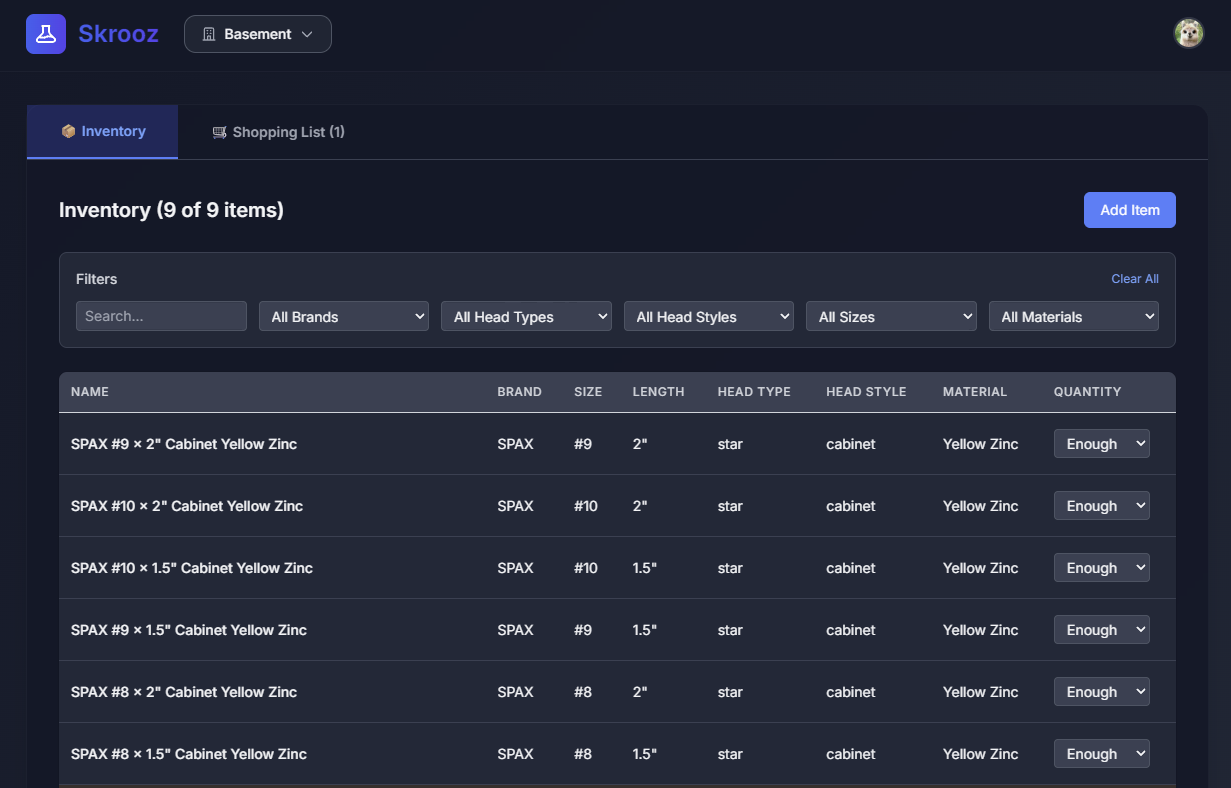
Case in point: I do a lot of DIY renovation work and woodworking (though not enough of the latter). I use a lot of screws and other hardware, and it can be very disruptive to run out. I try to stay organized and restock pre-emptively, but it’s easy to run out. What if there was an app that was purpose-built for tracking this, that made checking and updating inventory as simple as possible, and made it easy to restock? Even better, what if it was written exactly how I track my screws, and had all of the defaults set to the best values for me? Better still, what if it felt like the person who wrote it really understood my workflow and removed every unnecessary click or delay?

Screenshot of a vibe-coded screw inventory app.

Anyone familiar with app development knows that once you get into the domain-specific details and UX polish necessary to take something from good to great, the time really skyrockets. Screws have different attributes than nails, or hinges, or braces, or lumber. People do things in different ways, and if you miss one use case, they won’t use it. If you cover everything, it’s hard to use and doesn’t feel magical for anyone. You could knock out a very basic version in a few nights, maybe 10 hours, but this wouldn’t do much more than a spreadsheet, which is probably what you’ll go back to as soon as you find some bug or realize you need to refactor something. To make this thing delightful you’re likely in the 50-100 hour range, which is maybe in the embarrassing range when you tell your friends you just spent a month of free time writing an app to keep track of how many screws you have in your basement.

With the current crop of tools like Claude Code and Gemini CLI, that MVP takes 20 minutes, and you can do it while watching the Red Sox. Another hour and it’s in production, and starting to accrue some nice-to-have features, even if the Rays played spoiler and beat the Sox. It works great on desktop and mobile, it safely fits on the free tiers of services like Firebase and Vercel so it’s basically maintenance-free. One more hour while you’re poking around YouTube and you’ve got a fairly polished tool you’re going to use for a while.

I think most people probably have a deep well of things they’d like to have, that never made any financial sense, and probably aren’t interesting to anyone else. We’ve probably even self-censored a lot of these things so we’re not even coming up with as many ideas as we could. But when the time/cost drops by 90% or more, and you can take something from good to great, and have it tailored exactly to you, it’s a whole new experience.

The term “personal computing” went out of style decades ago, and now it feels like we’re all doing the same things in the same way with the same apps, but maybe it’s time to start thinking for ourselves again?

Driverless Cars

I completely agree with the headline of this blog post, but not with the overall sentiment.  Driverless cars are going to change the world, and for the better.  I’m not sure how much they will do so in my lifetime, it’s hard to believe that anyone born before 1985 or so is going to completely trust them.

The car insurance industry will cease to exist. These cars aren’t going to crash. Even if there are hold-outs that drive themselves, insurance would be so expensive they couldn’t afford it, as no one else would need it.

These cars will crash.  For as long as humans are allowed to drive, they will be causing accidents, hitting other driverless cars and each other.  There are also a number of causes of accidents that are still going to happen, such as those involving wildlife or severe weather or mechanical failure.  The robocars will handle these situations far better than humans, but they will still happen, and people will still be injured and killed as a result.

If the cars don’t crash, then the auto collision repair / auto body industry goes away. The car industry also shrinks as people don’t have to replace cars as often.

The car industry will likely shrink over time, just as any other technology-driven industry as.  They will be forced to evolve to new products.  This will happen slowly enough that if they’re properly managed, they should be able to shrink through attrition.

Long-haul truck driving will cease to exist. Think how much money trucking companies will save if they don’t have to pay drivers or collision and liability insurance. That’s about 3 million jobs in the States. Shipping of goods will be much cheaper.  On that note, no more bus drivers, taxi drivers, limo drivers.

This is definitely true.  I bear no ill will towards professional drivers but I think we can find jobs that are more rewarding for people than driving goods or passengers from point A to point B, and often drive back to A with an empty truck.  Trucks also account for the vast majority of road wear, a single tractor trailer can do as much damage to a road as nearly 10,000 normal cars.  The main reason we load so much weight onto a truck is so you only need one driver.  It will be more efficient to send smaller loads by robotruck, as they can be better targeted (think one truck per state rather than one truck per region), which will result in smaller trucks.

Meter maids. Gone. Why spend $20 on parking when you can just send the car back home? There goes $40 million in parking revenue to the City of Vancouver by the way.

Considering much of that revenue is probably supporting the collection of that revenue (meter maids, infrastructure, towing, courts,etc.) I don’t think this is a net loss.  Also, fewer parking spots means more pleasant streets with less traffic problems.

Many in cities will get rid of their cars altogether and simply use RoboTaxis. They will be much cheaper than current taxis due to no need for insurance (taxi insurance costs upwards of $20,000/year), no drivers, and no need for taxi medallions (which can cost half a million in Vancouver). You hit a button on your iPhone, and your car is there in a few minutes.  Think how devastating that would be to the car industry. People use their cars less than 10% of the time. Imagine if everyone in your city used a RoboTaxi instead, at say 60% utilization. That’s 84% fewer cars required.

Absolutely!

No more deaths or injuries from drinking and driving. MADD disappears. The judicial system, prisons, and hospital industry shrink due to the lack of car accidents.

Let us hope that we don’t see MADD exhibit the Shirky Principle (“Institutions will try to preserve the problem to which they are the solution”) and simply fades away to an irrelevance we can all agree is a success.

Car sharing companies like Zip, Modo, Car2Go are all gone. Or, one of them morphs into a robo-taxi company.

I think they will definitely be robotaxis, but there will also be a need for specialty cars like pickups.  We may even see an increased diversity of car designs available for rental where you can have a special grocery-mobile sent over, or a van with 12 seats, or one with extra entertainment options for your long trips, and so on.

Safety features in cars disappear (as they are no longer needed), and cars will become relatively cheaper.

Very unlikely, as people buy fewer cars and use them less frequently the prices will go up accordingly.  We’ll also probably require, through legislation, even more safety features, simply because of an inherent distrust of the technology.

I’m  really hoping that robocars are a reality within the next 30-40 years when I will be at the point where I shouldn’t be driving any more, and I’m happy to see that we actually seem on track to do that.

Software that isn’t afraid to ask questions

An area that user-focused software has gotten better at in the past 10 years or so is being aware, and protective of, the context in which users are operating. Things like autocomplete and instant validation are expected behaviors now. An area that software is really picking up steam is analytics, understanding behaviors. You see lightweight versions of this creeping into consumer software with things like Mint.com and the graphs in Thunderbird, but most of the cool stuff is happening on a large scale in Hadoop clusters and hedge funds, because that where the money is right now.

But where software has not been making advancements is in being proactively helpful, using that context awareness, as well as those analytics. If that phrase puts you in a Clippy-induced rage, my apologies, but I think this is an area where software needs to go. I think Clippy failed because it was interfering with creative input. We’ve since learned that when I user wants to tell you something, you want to expedite that, not interfere. Google’s famed homepage doesn’t tell you how, or how to search. They’ve adapted to work with what people want to tell it.

I’m talking about software that gets involved in things computers are good at, like managing information, and gets involved in the process the way that a helpful person would. We’ve done some of this in simple, mechanical ways. Mint.com will tell me when I’ve blown my beef jerky budget, Thunderbird will remind you to attach a file if you have the word “attached” in your email. I think this is a teeny-tiny preview of where things will go.

Let’s say you get a strange new job helping people manage their schedule. You get assigned a client. What’s the first thing you do, after introducing yourself? You don’t sit there and watch them, or ask them to fill out a calendar and promise to remind them when things are due. No, you ask questions. And not questions a computer would currently ask, but a question like “what’s the most important thing you do every day?”. Once you’ve gotten a few answers, you start making specific suggestions like “Do you think you could do this task on the weekends instead of before work?”.

Now, we’re a long way from software fooling people into thinking it cares about them, or understand their quirks, but we’re also not even trying to do the simple stuff. When I enter an appointment on Google calendar, it has some fields I can put data in, but it makes no attempt to understand what I’m doing. It doesn’t try to notice that it’s a doctor’s appointment in Boston at 9am and that I’m coming from an hour away during rush hour, and maybe that 15 minute reminder isn’t really going to do much. It would be more helpful if it asks a question like “are you having blood drawn?”, because if I am, it can then remind me the night before that I shouldn’t eat dinner. It can look at traffic that morning and tell me that maybe I should leave even earlier because there’s an accident. It can put something on my todo list for two weeks from now to see if the results are in. All from asking one easy question.

Now, a programmer who got a spec with a feature like this would probably be speechless. The complexity and heuristics involved are enormous. It would probably get pared down to “put doctor icon on appointment if the word doctor appears in title”. Lame, but that’s a start, right? I think this behavior is going to be attacked on many fronts, from “dumb” rules like that, to fancy techniques that haven’t even been invented yet.

I’ve started experimenting with this technique to manage the list of ideas/tasks I have. In order to see how it might work, I’ve actually forbidden myself to even use a GUI. It’s all command line prompts, because I basically want it to ask me questions rather than accept my commands. There’s not much to it right now, it basically picks an item off the list, and says, “Do you want to do this?” and I have to answer it (or skip it, which is valid data too). I can say it’s already done, or that I can’t do it because something else needs to happen first, or that I just don’t want to do it today.

If it’s having trouble deciding what option to show me, it will show two of them and say “Which of these is more important?”. Again, I’m not re-ordering a list or assigning priorities, I’m answering simple questions. More importantly, I’m only answering questions that have a direct impact on how the program helps me. None of this is artificial intelligence or fancy math or data structures, the code is actually pretty tedious so far, but even after a few hours, it actually feels helpful, almost personable.

If you know of any examples of software that actually tries to help in meaningful ways, even if it fails at it, let me know!